

-qzKsQUtsppAZbUEzpdYoHKlOUjQLgwsb.jpg)
告别手动录入!视频号私信手机号“暴力提取”脚本全攻略
一、 背景:私信翻到手酸,效率却极低?
作为视频号运营者,最头疼的莫过于私信后台的线索整理。用户咨询留下的手机号,往往淹没在成千上万条私信里。
一个个手动复制?太慢。
请兼职录入?成本太高。
平台界面频繁更新?很多以前的插件都失效了。
为了彻底解决这个问题,我和我的AI助手一起迭代出了这个 “暴力穿透版 V1.0” 脚本。
二、 脚本核心亮点:为什么叫“暴力穿透”?
很多自动化脚本会依赖网页的 class 或 id 名,但大厂的前端代码结构经常变动,一旦改名,脚本就报废。
V1.0 的核心逻辑改进:
不看类名,只看逻辑: 它采用全文本节点扫描,直接捕捉网页中符合“时间格式”和“手机号位数”特征的内容。
双重提取机: 优先尝试精准匹配对话卡片;如果页面结构太复杂,会自动切换到“全量文本流”扫描,确保不错过任何一个号码。
支持日期筛选: 自带日期过滤功能,你可以只提取最近一段周期的线索。
一键导出 CSV: 直接生成表格,无缝对接你的 CRM 或 Excel。
三、 脚本代码(Tampermonkey 版)
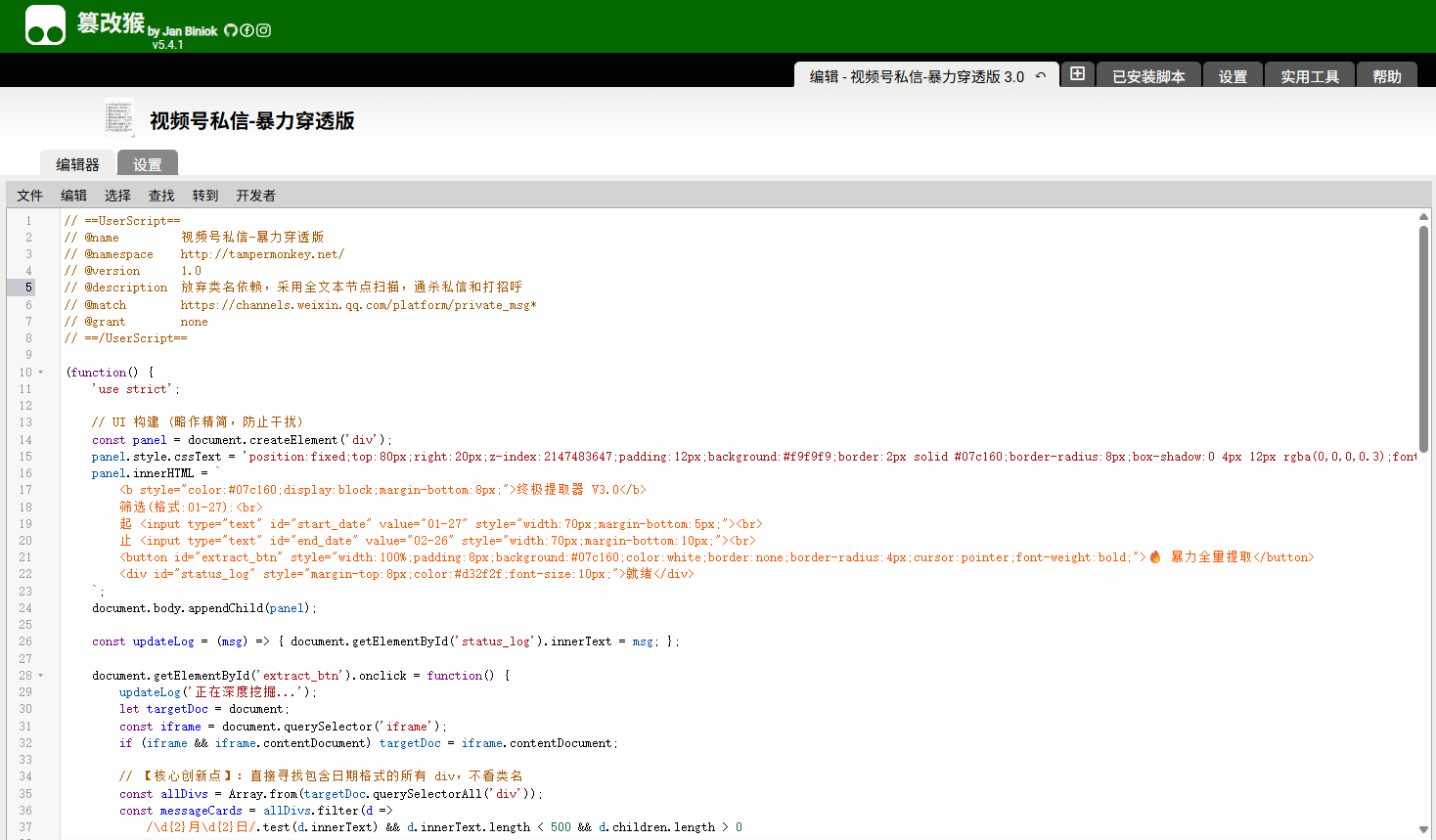
你可以直接将以下代码复制到油猴(Tampermonkey)插件中:
// ==UserScript==
// @name         视频号私信-暴力穿透版
// @namespace    http://tampermonkey.net/
// @version      1.0
// @description  放弃类名依赖,采用全文本节点扫描,通杀私信和打招呼
// @match        https://channels.weixin.qq.com/platform/private_msg*
// @grant        none
// ==/UserScript==

(function() {
    'use strict';

    // UI 构建
    const panel = document.createElement('div');
    panel.style.cssText = 'position:fixed;top:80px;right:20px;z-index:2147483647;padding:12px;background:#f9f9f9;border:2px solid #07c160;border-radius:8px;box-shadow:0 4px 12px rgba(0,0,0,0.3);font-size:12px;width:160px;color:black;';
    panel.innerHTML = `
        <b style="color:#07c160;display:block;margin-bottom:8px;">终极提取器 V3.0</b>
        筛选(格式:01-27):<br>
        起 <input type="text" id="start_date" value="01-27" style="width:70px;margin-bottom:5px;"><br>
        止 <input type="text" id="end_date" value="02-26" style="width:70px;margin-bottom:10px;"><br>
        <button id="extract_btn" style="width:100%;padding:8px;background:#07c160;color:white;border:none;border-radius:4px;cursor:pointer;font-weight:bold;">🔥 暴力全量提取</button>
        <div id="status_log" style="margin-top:8px;color:#d32f2f;font-size:10px;">就绪</div>
    `;
    document.body.appendChild(panel);

    const updateLog = (msg) => {
        document.getElementById('status_log').innerText = msg;
    };

    document.getElementById('extract_btn').onclick = function() {
        updateLog('正在深度挖掘...');
        let targetDoc = document;
        const iframe = document.querySelector('iframe');
        if (iframe && iframe.contentDocument) targetDoc = iframe.contentDocument;

        // 【核心创新点】:直接寻找包含日期格式的所有 div,不看类名
        const allDivs = Array.from(targetDoc.querySelectorAll('div'));
        const messageCards = allDivs.filter(d =>
            /\d{2}月\d{2}日/.test(d.innerText) && d.innerText.length < 500 && d.children.length > 0
        );

        if (messageCards.length === 0) {
            updateLog('未能定位容器,尝试全文本扫描...');
            extractFromRawText(targetDoc);
            return;
        }

        processAndDownload(messageCards);
    };

    function processAndDownload(nodes) {
        let results = "昵称摘要,手机号,来源,日期\n";
        const phoneRegex = /1[3-9]\d{9}/g;
        let count = 0;

        nodes.forEach(node => {
            const fullText = node.innerText;
            const lines = fullText.split('\n').filter(l => l.trim().length > 0);

            // 尝试获取昵称
            const nick = lines[0] || "未知";
            const dateMatch = fullText.match(/\d{2}月\d{2}日/);
            const dateStr = dateMatch ? dateMatch[0] : "未知日期";

            const phones = fullText.match(phoneRegex) || [];
            if (phones.length > 0) {
                Array.from(new Set(phones)).forEach(p => {
                    results += `"${nick.substring(0,20)}","${p}","自动识别","${dateStr}"\n`;
                    count++;
                });
            }
        });

        saveCSV(results, count);
    }

    function extractFromRawText(doc) {
        const fullText = doc.body.innerText;
        const phoneRegex = /1[3-9]\d{9}/g;
        const allPhones = fullText.match(phoneRegex) || [];

        if (allPhones.length === 0) {
            updateLog('全网页未找到号码');
            alert('即便扫描了全网页也没找到手机号。请确认列表是否已加载出号码文字?');
            return;
        }

        let results = "发现的号码\n" + Array.from(new Set(allPhones)).join('\n');
        saveCSV(results, allPhones.length);
    }

    function saveCSV(data, total) {
        const blob = new Blob(["\ufeff" + data], { type: 'text/csv;charset=utf-8;' });
        const link = document.createElement("a");
        link.href = URL.createObjectURL(blob);
        link.setAttribute("download", `视频号_提取结果_${total}条.csv`);
        link.click();
        updateLog(`成功提取 ${total} 个`);
        alert(`成功!已从当前页面抓取到 ${total} 个手机号。`);
    }
})();
四、 使用说明
准备环境: 浏览器安装 Tampermonkey(油猴)插件。
新建脚本: 点击油猴图标 -> 管理面板 -> 新建脚本,把上面的代码全选覆盖进去并保存。
打开后台: 登录你的视频号助手,进入【私信管理】页面。
开始提取: 页面右侧会出现一个绿色的小面板,设定好日期范围(注意格式如 01-27),点击“暴力全量提取”即可。
五、 碎碎念(免责声明)
本工具仅用于提升工作效率,请务必在遵守相关法律法规及平台规则的前提下使用。
尊重用户隐私,提取到的数据请妥善保管,切勿泄露或用于非法用途。
本文是原创文章,采用 CC BY-NC-ND 4.0 协议,完整转载请注明来自 程序员小航
评论
匿名评论
隐私政策
你无需删除空行,直接评论以获取最佳展示效果


-qzKsQUtsppAZbUEzpdYoHKlOUjQLgwsb.jpg?width=400)
-jZiVRNUKDRnSGpDbrfgxyLlgBseVZBVK.jpg?width=400)